How it works
Dispatch It Yourself, or Hand It to the AI
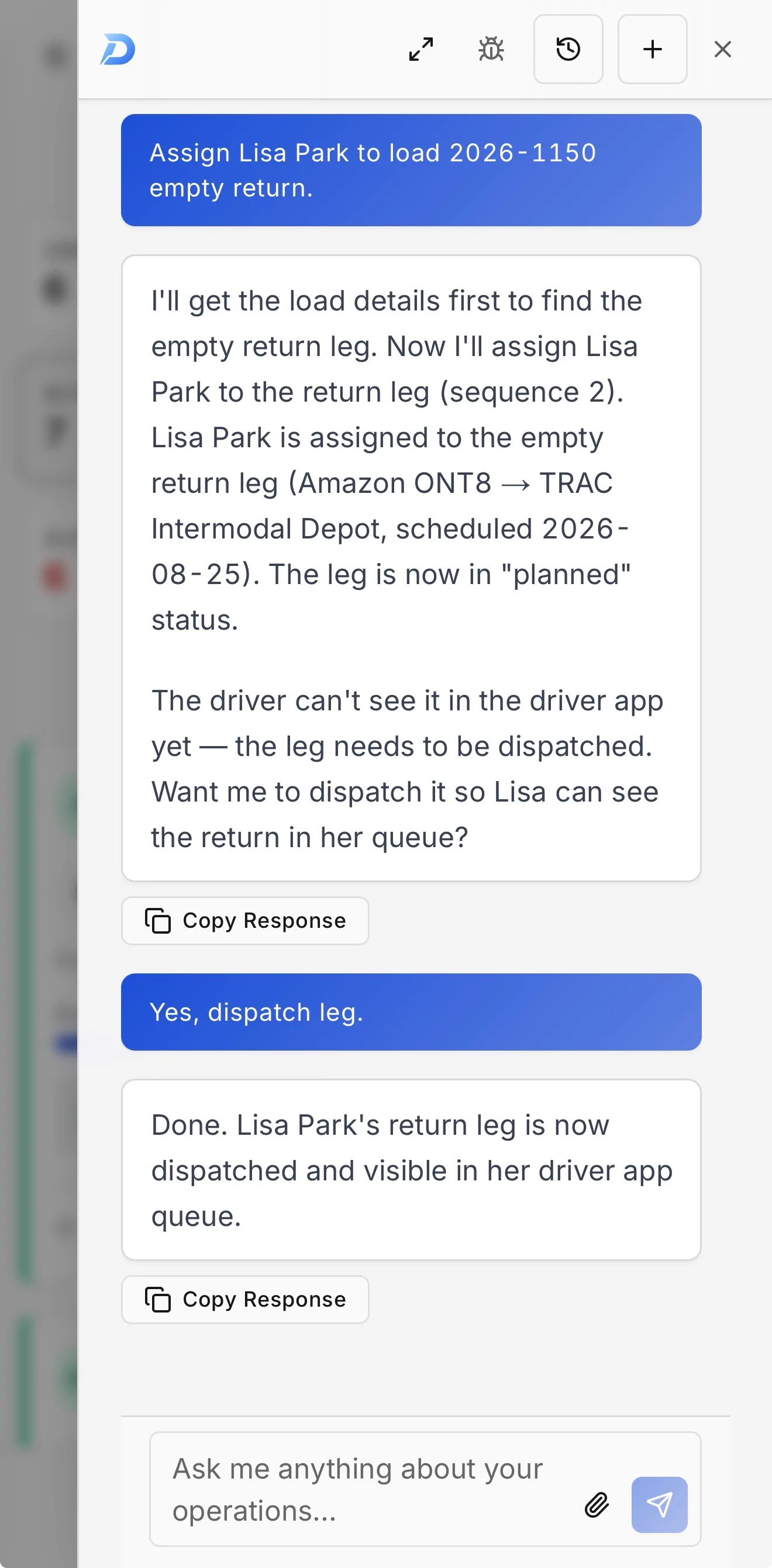
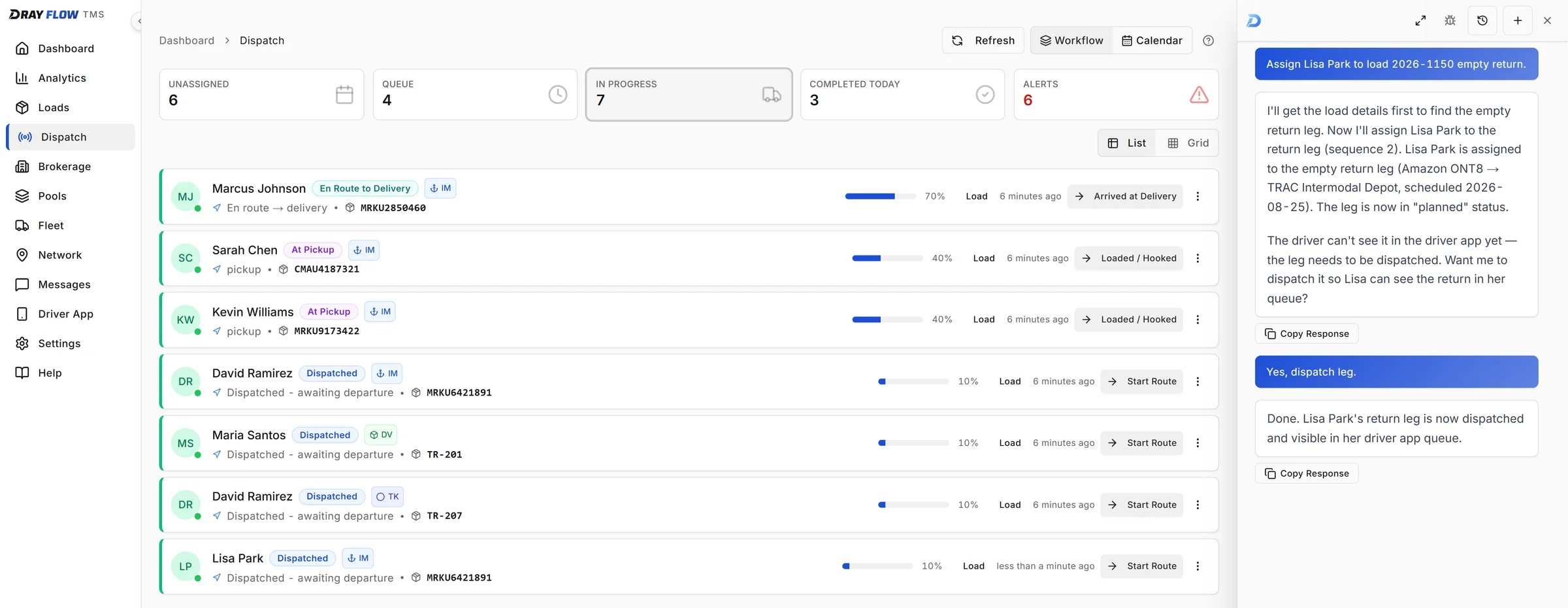
A robust dashboard with real-time tracking and bulk actions, plus an AI assistant that looks things up and does the data entry for you. If you run solo, it works like a second dispatcher.
Real screenshots, taken in the demo workspace every new account starts in.
Instant Actions
Type one line instead of clicking through screens
Real-Time Updates
Dashboard syncs automatically as AI makes changes
You Stay in Control
Every action the AI takes is one you could make yourself in the dashboard
Features
Everything you need to run your operation
A full-featured TMS with real-time dashboards and bulk actions, plus a built-in AI assistant for when you want to work even faster.
- Intermodal
- Dry Van
- Reefer
- Flatbed
- Heavy Haul
- Tank
- and more
Built-In AI Assistant
Need a shortcut? Type "Find me late loads" or "Assign John to 2026-1042" and the AI handles it. Works alongside the full dashboard, so use whichever way fits your workflow.
Learn moreMulti-Type Load Management
One system for all your freight. Handle containers, dry vans, reefers, flatbeds, heavy haul, and tankers with the same intuitive interface. No need to switch between different TMS tools.
Leg Building & Dispatch
Handle complex multi-stop routes effortlessly. Port pickup → warehouse → final delivery? Dray Flow builds the legs, assigns resources, and tracks progress across every step.
Learn morePool Dispatch
Run high-volume shuttle work without hand-building every move. Group containers or trailers into a pool, dispatch turns to your drivers, and let them claim units in the field. A live board shows every unit cycling from terminal to delivery and back. Optional add-on, coming soon.
Fleet Management
Know your equipment status at a glance. Track driver availability, truck maintenance, trailer locations, and chassis pools. Never send a driver to the wrong equipment again.
Driver Mobile App
Drivers see their assigned legs, update statuses, upload photos, and report issues, all from their phone. Works offline when connectivity is spotty, with auto-sync when back online.
And the rest of the operation
Dispatch
Unassigned, Queue, In Progress, Completed, and Alerts boards, plus a calendar view.
Brokerage Desk
Tender loads to partner carriers when your own fleet is maxed out. Optional add-on, coming soon.
Financial Tracking
Revenue, costs, and accessorial charges tracked per load.
Customer & Location Management
A reusable library of customers, facilities, and contacts.
Document Management
BOLs, PODs, and field photos captured from the mobile app.
Compliance Tracking
Insurance, DOT inspections, and medical cards in one place.
Security & Audit Trail
Tenant isolation, encryption, role-based access, and an audit trail on your operational records.
Pricing
The platform is free. Add what you need.
Run your whole operation on the free plan. Pay only when you add a teammate, AI, or an add-on. No setup fees, no per-driver charges.
The platform
The full TMS for one office user: dispatch, fleet, customers, documents, and the driver mobile app. No credit card required.
- Unlimited loads and legs
- Unlimited drivers, always free
- Driver mobile app
- Dispatch board and calendar
- Messaging with your drivers
- Fleet management
- Bulk actions, CSV import and export
- Full AI in the demo sandbox, free 7 day AI trial at go-live
Extra office seat
Add a dispatcher, an accountant, anyone who works in the office. Same full platform as you.
AI seat
The AI dispatcher on your live data, plus AI document intake for BOLs and rate cons. $199 total for that person, the seat itself is included.
Add-ons
Optional features for your whole team. One price covers every user, never per seat.
What your bill looks like
Drivers ride along free in every row, however many you run.
Add-ons
Optional extras at $25/mo each, one price for your whole team. All three are coming soon.
Brokerage
Cover the loads your trucks can't. Tender overflow to partner carriers, track rate cards and margins, and keep the customer.
Pool Dispatch
Pre-build pools of repeat work and let drivers claim the next container or trailer from their phones as they cycle.
Analytics & Reports
Dashboards on your own operating data: margins by customer and lane, on-time performance, and volume trends.
A “seat” is a back-office user. The owner’s seat is free on every plan, and drivers are always free and never count as seats. An AI seat is $199 total, the seat itself is included. Add-ons are priced per company, not per seat. No long-term contracts. Cancel anytime. Prices exclude applicable taxes.
From the founder
Why I built Dray Flow
Twelve years behind the wheel. I drove for carriers that ran on spreadsheets and a steady stream of text messages, so this isn't a problem I read about. I was writing code that whole time, so I built the TMS I wished my dispatchers had. When AI got good enough to matter, it slipped into a product that was already solid and made it faster.
Dray Flow is real software, built for growing your business. The free tier is open to everyone.
FAQ
Frequently asked questions
Pricing, data, security, and getting started.
How does the AI actually work?
Is my data secure and private?
What types of freight can Dray Flow handle?
Does Dray Flow handle peel-off or drop-and-hook pools?
How is Dray Flow different from other TMS systems?
How long does it take to learn?
What kind of support do you offer?
What's included in the free plan?
What does 'per seat' mean? Do drivers count?
Can I really cancel anytime?
What are the free plan limits?
Can I import my existing data?
How do I get started?
Still have questions?
Contact Our TeamReady to get off spreadsheets?
Free forever plan. Unlimited drivers. No contracts. AI $199/person/month + applicable tax.